
GoLinks just launched an MCP (Model Context Protocol) server, making it possible to search, create, and manage your team’s go links directly inside AI tools like Claude, Claude Code, and Cursor. Go links have always been built around reducing friction — replacing long URLs with short, memorable shortcuts your whole team can use. The MCP server extends that idea into AI-native workflows, so the institutional knowledge your team has organized in GoLinks is reachable from wherever work actually happens, without switching tabs or opening a separate dashboard.
What Is the GoLinks MCP Server?
The GoLinks MCP server is a Model Context Protocol server that connects your team’s go link library to any MCP-compatible AI tool. It supports two core operations: searching and looking up go links by keyword or destination, and creating and managing go links on the fly. The server authenticates against your GoLinks workspace, so it surfaces only the links your organization has created — the curated, human-maintained index of resources your team uses every day. Setup follows the standard MCP configuration process for each client, and the server works with Claude, Claude Code, Cursor, and any other MCP-compatible tool.
What Can You Do with GoLinks MCP?
Search and look up go links. Ask your AI assistant which go link points to your onboarding docs, your latest product roadmap, or your on-call runbook. Instead of opening GoLinks and searching manually, the result comes back inline — in the same conversation or coding session where you need it. This is especially useful when you remember that a go link exists but not the exact keyword, or when you want to reference a shortlink inside an AI-generated document without leaving the tool.
Create and manage go links. Create a new go link directly from your AI environment. If you paste a long Confluence URL into a doc and want to give it a shortlink, you can do it through Claude or Cursor without interrupting your workflow. This keeps your team’s go link library current without requiring a separate dashboard visit every time a new resource gets created.
Where Does it Work?
Claude: Connect the GoLinks MCP server to search and manage go links inside any Claude conversation. This is useful during research, writing, or planning sessions when you need to reference or create a shortlink without breaking focus.
Claude Code: Engineers using Claude Code for agentic coding workflows can pull go links directly into their sessions. If a go link points to an API spec, a deployment runbook, or a service architecture doc, Claude Code can surface it without leaving the terminal.
Cursor: Cursor users can access go links while writing or refactoring code — useful any time documentation, design specs, or internal resources are stored behind a shortlink in your team’s library.
ChatGPT: Users on ChatGPT can search and manage go links inside ChatGPT conversations. This is particularly useful for teams that use ChatGPT for drafting, summarization, or research and want access to their shortlink library without switching tools.
Windsurf. Windsurf users can access go links inside Windsurf’s agentic coding environment. When Cascade is working through a multi-step task, it can look up the right internal resource by shortlink or create a new one — keeping institutional knowledge accessible without breaking the flow of an agentic session.
Cline. Cline users can pull go links into VS Code alongside their AI coding workflow. If a go link points to an internal API reference, a tech spec, or a team wiki page, Cline can surface it as part of a task without requiring a separate browser lookup.
GoSearch: Teams that use GoSearch can bring go link actions into GoSearch’s custom agents and multi-app workflows. A GoSearch agent can look up the right shortlink as part of a broader task, or create a new go link when a workflow produces a resource worth saving — without any manual steps outside the workflow.
Other MCP-compatible clients: Because the GoLinks MCP server is built on the open MCP standard, it works with any client that supports the protocol — including AI coding assistants, agentic IDE extensions, and custom internal tools your team may already use. If your tool supports MCP, you can authenticate with your GoLinks workspace and start querying your go link library from there. No custom integration work required.
How to Get Started
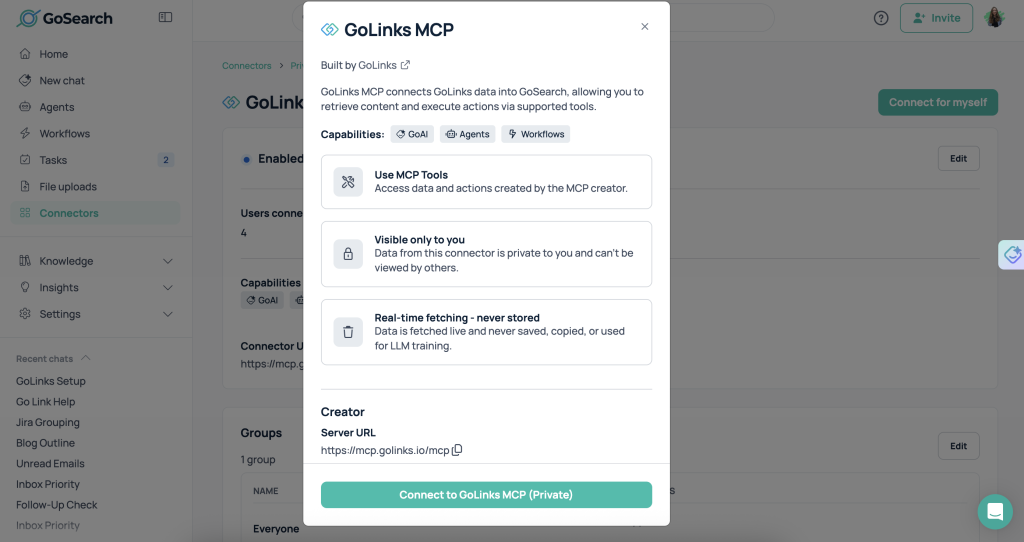
The GoLinks MCP server is available now. You will need a GoLinks account and API credentials to authenticate. Setup follows the standard MCP configuration process for your chosen client. Below, we’ll walk through the steps to connect in GoSearch.
Connect the GoLinks MCP Server to GoSearch
- In GoSearch, navigate to Connectors.
- Locate GoLinks MCP under Private Connectors. These connectors are enabled by your administrator but must be connected individually. Data from private connectors is visible only to you.
- Click Connect.
- Review the GoLinks MCP connector details and available capabilities, then click Connect to GoLinks MCP.
- An authentication window will appear showing the permissions requested by GoSearch:
- Go links — view go links and their information
- Go links — create and edit go links
- Search — view search results
- Click Authorize.
- Once authorization is complete, the GoLinks MCP server will be connected and available for use in GoSearch agents and workflows.
Go Links Belong Where Work Happens
Go links work because they meet people where they are — in the browser, in Slack, in a conversation. AI tools are now a primary workspace for engineers, writers, ops teams, and knowledge workers across every industry. The GoLinks MCP server makes sure your team’s shortlink library travels with them into those environments. Whether you’re writing in Claude, coding in Cursor, or running an automated workflow in GoSearch, your go links are one query away.
New to GoLinks? Sign up for free and get started instantly.
Access and share resources instantly with GoLinks
Try for free
Frequently Asked Questions
The GoLinks MCP server is a Model Context Protocol server that connects your team’s go link library to MCP-compatible AI tools. It lets you search for existing go links and create or manage new ones without leaving your AI tool. It works with Claude, Claude Code, Cursor, GoSearch, and any other MCP-compatible client.
The GoLinks MCP server supports two primary operations: searching and looking up go links by keyword or destination URL, and creating and managing go links directly from your AI environment. Both operations work against your authenticated GoLinks workspace.
Yes. The GoLinks MCP server works with Claude Desktop, claude.ai, and Claude Code. Once connected, you can search for go links and create new ones directly inside any Claude conversation or agentic coding session.
Yes. Teams using GoSearch can connect the GoLinks MCP server to bring go link actions into GoSearch’s custom agents and multi-app workflow automation. This lets agents look up or create go links as a step in a broader workflow — without any manual handoff outside the agent.
The GoLinks MCP server works with any MCP-compatible AI client, such as Claude, Claude Code, Cursor, ChatGPT, Windsurf, Cline, GoSearch, and more. Because MCP is an open standard, additional tools will work as the ecosystem expands.
Yes. You need an active GoLinks account and valid API credentials to authenticate. Visit golinks.io to get started or connect your existing workspace.