

Without effective knowledge sharing tools, employees struggle to stay productive — especially in remote and hybrid environments where work happens asynchronously across time zones. When knowledge is fragmented across tools, inboxes, and conversations, teams lose time searching for information instead of acting on it.
Organizations that invest in strong knowledge sharing systems enable employees to access historical context, make better decisions, and complete work faster. As companies scale, these tools become essential for preserving institutional knowledge, improving collaboration, and maintaining momentum.
In this guide, we break down what knowledge sharing is, why it breaks down in remote workplaces, and the best knowledge sharing tools to help distributed teams work smarter and more efficiently.
What Is Knowledge Sharing?
Knowledge sharing is the process of exchanging information, expertise, and insights across individuals and teams within an organization.
While the concept sounds straightforward, execution is often difficult. Nearly 60% of employees report challenges finding the information they need to do their jobs effectively. As organizations grow and teams become more distributed, informal knowledge sharing — hallway conversations, quick desk check-ins — disappears.
With average employee turnover hovering around 20%, any knowledge that isn’t documented or easily discoverable is at risk of leaving the organization entirely.
In short: knowledge sharing tools turn individual know-how into durable, searchable organizational intelligence.
The Top Challenges With Knowledge Sharing
The biggest challenge organizations face isn’t access to public information — it’s preserving company-specific knowledge.
According to employees, 81% say internal, institutional knowledge is the hardest to replace. This problem typically stems from two root causes:
1. Lack of Systems
Without clear, centralized knowledge sharing tools, information lives in silos — buried in chats, inboxes, or personal folders.
2. Lack of Adoption
Even when tools exist, employees may not understand how to use them or why they matter, leading to low engagement and inconsistent usage.
Organizations that solve both problems gain a significant competitive advantage by retaining knowledge, reducing onboarding time, and improving execution speed.
Building a Culture of Effective Knowledge Sharing
Technology alone doesn’t solve knowledge sharing — culture does.
High-performing organizations encourage transparency, real-time collaboration, and documentation as part of daily work. Incentives, leadership modeling, and People Ops involvement all play a role in ensuring that knowledge sharing tools are adopted consistently across teams.
When knowledge sharing is treated as a shared responsibility — not an extra task — tools become accelerators instead of obstacles.
Knowledge Sharing Tools and Techniques
Knowledge Sharing Tools Comparison Table
| Tool Category | Primary Purpose | Best For | Example Tools |
|---|---|---|---|
| Proprietary Online Training | Capture and scale company-specific knowledge | Onboarding, continuous learning, enablement | Seismic Learning, Eloomi |
| AI-Powered Decision Making | Surface insights and guide faster decisions | New hires, managers, data-heavy teams | ClickUp AI, Athenic AI |
| Link Management | Make shared resources easy to access and remember | Internal documentation, onboarding, daily workflows | GoLinks, Workona |
| Project Management Software | Centralize tasks, updates, and documentation | Cross-functional collaboration | Asana, Jira |
| Meetings & Verbal Knowledge Sharing | Capture and retain spoken knowledge | Sales, training, leadership alignment | Zoom, Clari Copilot, Panopto |
| Chat Platforms | Enable real-time and async knowledge exchange | Distributed teams, quick collaboration | Slack, Microsoft Teams |
| Digital Asset Management | Store and retrieve files and brand assets | Marketing, legal, content teams | Box, Canto |
| SOPs & Project Documentation | Standardize and document repeatable processes | Operations, IT, HR | Process Street, Notion |
| Screen Recording Tools | Explain workflows visually and asynchronously | Remote teams, product walkthroughs | Loom, Vidyard |
| Shared Digital Whiteboards | Visual collaboration and ideation | Product, design, engineering | Miro, Sketchboard |
| Enterprise Search Tools | Unify access to knowledge across systems | Large, scaling organizations | GoSearch |
| Employee Connection Tools | Surface expertise and enable people-based knowledge sharing | Cross-team collaboration, remote organizations, expertise discovery | GoProfiles |
There are no quick fixes for establishing effective knowledge sharing. Most companies will need a combination of the following tools and techniques.
1. Proprietary Online Training
Company-specific knowledge rarely exists online. Custom training programs help capture internal expertise and scale it across teams, ensuring critical knowledge is accessible beyond individual employees.
Tool Recommendations
Seismic Learning — Ongoing training and practice for sales and customer-facing teams
Eloomi — Combines onboarding, training, performance, and engagement
2. AI-Powered Decision Making
AI-driven knowledge sharing tools help employees — especially new hires — interpret information, surface insights, and make faster, more informed decisions.
Tool Recommendations
ClickUp AI — AI-assisted task prioritization and workflow optimization
Athenic AI — Data analysis and decision support across internal and external sources
3. Link Management
Important knowledge often lives behind long, hard-to-remember URLs. Link management tools make shared resources instantly accessible and easy to recall.
Tool Recommendations
GoLinks — Secure, memorable short links for internal knowledge sharing
Workona — Centralized dashboards for online resources

4. Project Management Software
Project management tools centralize task updates, documentation, and collaboration, helping teams align and execute more efficiently.
Tool Recommendations
Asana — Popular with marketing and operations teams
Jira — Built for engineering and technical workflows
5. Meetings and Verbal Knowledge Sharing
Even in async-first environments, meetings remain critical for alignment and transferring contextual or tacit knowledge.
Tool Recommendations
Zoom — Web conferencing and webinars
Clari Copilot — Conversation intelligence for sales teams
Panopto — Video hosting, search, and knowledge capture
6. Chat Platforms
Chat tools enable real-time collaboration and quick knowledge exchange when conversations are organized and searchable.
Tool Recommendations
Slack — Channel-based communication and integrations
Microsoft Teams — Chat, meetings, and Microsoft ecosystem integration
7. Digital Asset Management
Digital asset management systems prevent knowledge and files from disappearing into email threads or chat history.
Tool Recommendations
Box — Secure file storage with permissions and metadata
Canto — Brand asset organization and sharing
8. SOPs and Project Documentation
Documented processes ensure work is repeatable, scalable, and accessible across teams and time zones.
Tool Recommendations
Process Street — SOP templates and checklists
Notion — Documentation, wikis, and project tracking
9. Screen Recordings
Short screen recordings clarify complex workflows and preserve context that text alone often misses.
Tool Recommendations
Loom — Quick, async video explanations
Vidyard — Video sharing for sales and marketing
10. Shared Digital Whiteboards
Visual collaboration tools support brainstorming, ideation, and spatial thinking for distributed teams.
Tool Recommendations
Miro — Real-time collaboration and visual mapping
Sketchboard — UX flows and technical diagrams
11. Enterprise Search Tools
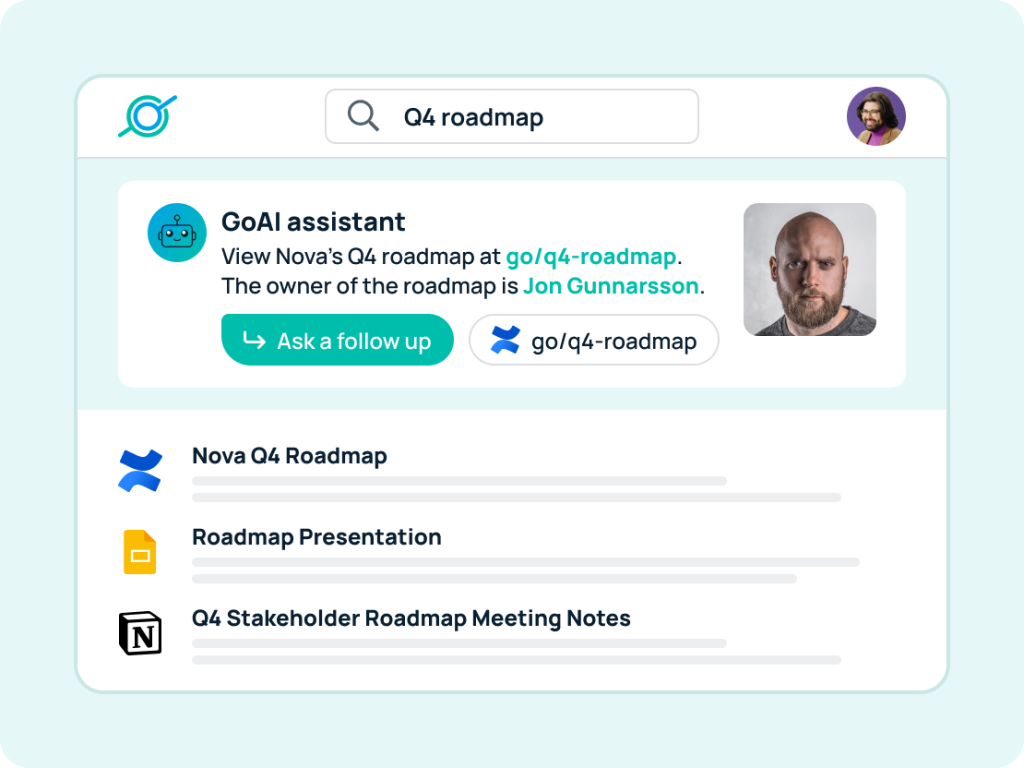
As organizations scale, knowledge becomes distributed across dozens of platforms. Enterprise search tools unify access and make information discoverable across systems.
Tool Recommendation
GoSearch — AI-powered search that connects and surfaces knowledge across your entire tech stack
12. Employee Connection Tools
In any organization, building strong connections between employees is essential for fostering effective knowledge sharing. Employee connection tools help team members discover who in the company has the knowledge they need, enabling collaboration and facilitating more efficient knowledge exchange.
Tool recommendation:
- GoProfiles: An AI-powered employee connection and engagement platform that helps employees find the right coworkers to collaborate with based on expertise, projects, and organizational context.

Start Improving Knowledge Sharing With GoLinks
Whether you adopt one tool or an entire stack, effective knowledge sharing starts with making information easy to find and easy to share.
That’s where GoLinks plays a critical role.
By turning long, complex URLs into short, memorable go links, GoLinks removes friction from daily knowledge sharing. Employees can instantly access key resources, reduce search time, and collaborate more effectively — without breaking flow.

GoLinks transforms long, complicated URLs into short, memorable go links, making important resources easily accessible for all employees. With GoLinks, you can simplify your internal knowledge base, streamline access to shared content, and enhance collaboration between team members.
Empower your team to work smarter and faster. Start using GoLinks for free today and build a more connected, knowledge-driven workplace.
Access and share resources instantly with GoLinks
Try for free
Frequently Asked Questions About Knowledge Sharing Tools
Knowledge sharing tools are software platforms that help organizations capture, organize, and distribute information so employees can easily find, share, and reuse knowledge across teams, systems, and workflows.
Remote teams lack informal, in-person knowledge transfer. Knowledge sharing tools ensure information is documented, searchable, and accessible asynchronously, reducing delays, duplicate work, and dependency on individual employees.
Organizations typically use a combination of documentation tools, training platforms, chat tools, enterprise search, link management, and employee connection tools to support both documented knowledge and people-based expertise.
Knowledge sharing tools reduce time spent searching for information and recreating work. By making knowledge easy to access and share, teams make faster decisions, onboard employees more efficiently, and execute work with fewer interruptions.
Knowledge management systems focus on storing and organizing information, while knowledge sharing tools emphasize discovery, access, and collaboration. Most modern organizations use both to support structured documentation and daily knowledge exchange.
Enterprise search tools provide a single search experience across multiple systems, allowing employees to quickly find documents, conversations, and context regardless of where information is stored.
Employee connection tools help employees discover who has relevant expertise across the organization, enabling knowledge sharing through collaboration, conversations, and peer learning rather than documentation alone.