


An employee onboarding program is a structured process that helps new hires understand their role, access the tools they need, build relationships, and become productive. The strongest programs combine preboarding, a clear first-week plan, role-specific training, peer connection, accessible documentation, manager support, remote-ready practices, and ongoing measurement.
Most organizations have room to improve. Only 12% of employees strongly agree that their organization does a great job onboarding new employees, according to Gallup.
This guide explains the eight essentials of an effective employee onboarding program, provides a practical 30-60-90-day framework, and shows how tools such as GoLinks can make onboarding resources easier to find.
What Is an Employee Onboarding Program?
An employee onboarding program is a repeatable system for helping new employees become productive, connected, and confident in their roles. It typically begins before the employee’s first day and continues through the first 30, 60, or 90 days.
Full ramp-up often takes longer. Gallup finds that most people need 12 months or more to get fully up to speed in a new job.
An onboarding program may include:
- Preboarding communication
- Equipment and account setup
- Company orientation
- Role-specific training
- Manager check-ins
- Peer or buddy support
- Access to policies and documentation
- First projects and performance milestones
- New-hire feedback and measurement
How Is Onboarding Different from Orientation?
Orientation is usually a short introduction to the company, policies, benefits, and administrative requirements. Onboarding is the broader process of helping a new employee understand how to do their job, work with their team, find information, and contribute independently.
A strong employee onboarding program may include orientation, but it should not end after the first day.
What Should an Employee Onboarding Program Include?
A complete employee onboarding program should support new hires before day one, during their first week, and throughout their first several months.
| Time frame | Onboarding focus | Example deliverables |
|---|---|---|
| Before day one | Preparation | Equipment, accounts, schedule, welcome message |
| Day one | Belonging and orientation | Team introductions, company context, manager meeting |
| Week one | Role clarity | Training plan, role expectations, first assignment |
| First 30 days | Capability | Feedback, role milestones, peer connections |
| Days 31–60 | Contribution | Independent work, measurable goals, manager check-in |
| Days 61–90 | Progress and retention | Onboarding survey, development plan, review |
The best onboarding programs assign clear owners to each stage. HR may manage policies and benefits, IT may handle systems and access, managers may own role training, and peers or buddies may support social connection.
1. Start the onboarding process before the employee’s first day
A strong employee onboarding program begins before day one by giving new hires the information, equipment, access, and schedule they need to start confidently.
Preboarding tasks may include:
- Sending a welcome message
- Sharing the first-day and first-week schedule
- Confirming equipment delivery
- Creating email, identity, and software accounts
- Providing access to required systems
- Sharing the employee handbook and key policies
- Introducing the manager, team, and peer buddy
- Explaining where new hires should ask questions
Starting early prevents the first day from becoming a series of administrative delays. It also gives new hires a clear understanding of what to expect.
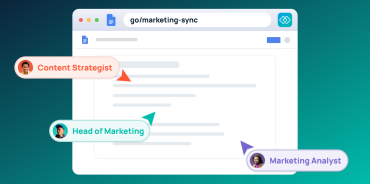
Use a centralized onboarding hub instead of sending new hires through a long series of disconnected messages. The hub should include the schedule, required forms, team information, training resources, and links to essential systems. Give it a memorable address, such as go/onboarding, so new hires can return to it anytime.
Three areas make preboarding easier to run consistently:
Automation
Manual handoffs between HR, IT, and managers create delays and inconsistencies. Once new-hire paperwork is finalized, integrations can trigger:
- Profiles creation in HRIS
- Account creation in IT service management system
- Welcome email sent to the new hire
- Onboarding meetings on the new hire’s calendar
- Single Sign-On (SSO) set up
Tools
The right tools help new hires find resources and people from day one:
- GoLinks: Create memorable short links, such as go/handbook, for every onboarding resource.
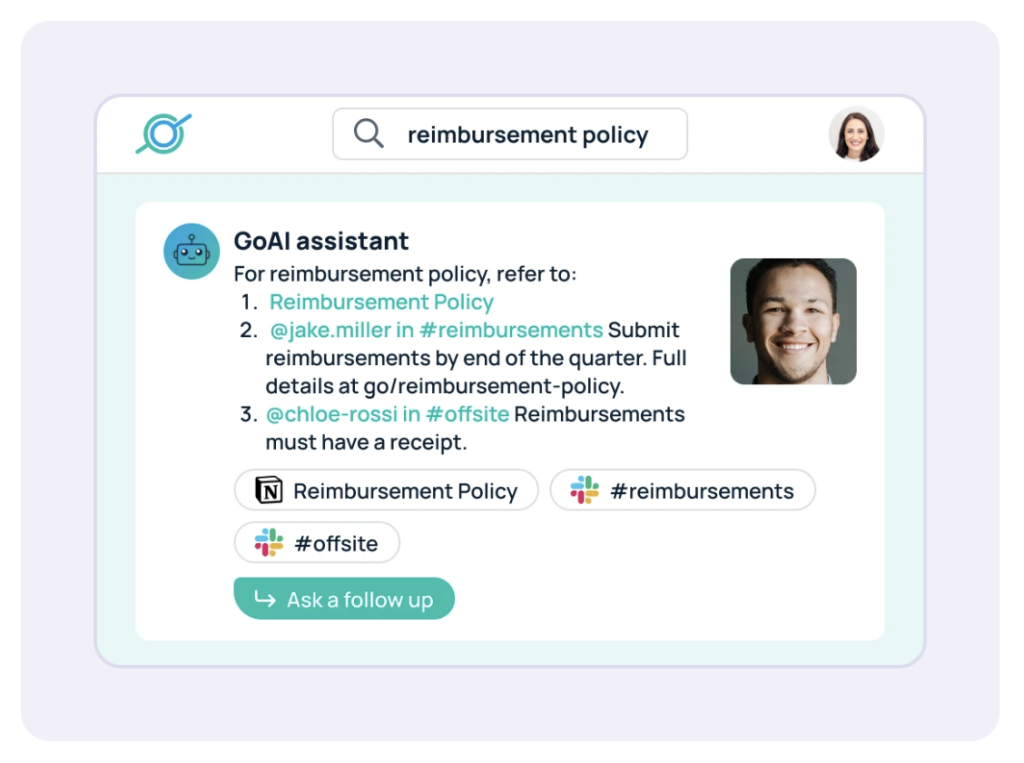
- GoSearch: Let new hires find documents, policies, and training materials from one search bar. With AI enterprise search, a new hire can ask what to set up in their first week and get an answer drawn from onboarding docs, IT guides, and team resources.
- GoProfiles: Help new hires learn who does what with employee profiles, an org chart, an employee map, and peer recognition.
Checklist
Build a 90-day onboarding checklist that covers everything from system access to team integration. Add go links to each item so new hires can open resources directly from the list.
2. Give new hires a clear first-week plan
New employees should know what they are expected to learn, complete, and understand during their first week.
A first-week plan might include:
| Day | Suggested focus |
|---|---|
| Day one | Welcome, company overview, manager meeting, team introductions |
| Day two | Systems access, security training, policies, and benefits |
| Day three | Role-specific training and process documentation |
| Day four | Shadowing, peer meetings, and first assignment |
| Day five | Week-one review, questions, feedback, and next steps |
The exact schedule will vary by role, but the structure should remain easy to follow. A new employee should not have to guess which meeting matters, which training is required, or where to find the next resource.
Managers should schedule regular check-ins during the first week instead of waiting for a new hire to ask for help. These conversations can cover progress, questions, access issues, team norms, and anything that remains unclear.
3. Provide role-specific training and milestones
Company orientation explains where an employee works. Role-specific training explains how the employee succeeds in that environment.
A role-specific onboarding plan should answer:
- What does success look like in this role?
- Which tools and systems does the employee use?
- Which processes should the employee learn first?
- Who owns the employee’s training?
- What should the employee complete by day 30?
- What should the employee be able to do independently by day 60 or 90?
Avoid giving every new hire the same generic training library. Shared company information is useful, but employees also need content that reflects their department, responsibilities, workflows, and customers.
Break training into milestones rather than assigning a large collection of documents and videos at once. Tie each milestone to the 30-, 60-, and 90-day checkpoints in the table above.
4. Help new hires build relationships
Successful onboarding is not only an information-transfer process. It also helps new employees build the relationships they need to collaborate and ask for help.
Include structured opportunities for new hires to connect with:
- Their manager
- Immediate teammates
- A peer buddy or mentor
- Cross-functional partners
- Department leaders
- Employee resource or interest groups
Useful activities include:
- Virtual or in-person coffee conversations
- Team introductions
- Cross-functional meet-and-greets
- Job shadowing
- Team-building activities
- Informal question-and-answer sessions
- Recognition of early milestones
A peer buddy can help with questions that a new employee may not want to raise with their manager. A buddy can explain team norms, communication patterns, common processes, and where to find information.
Employee directories and profile tools can also make it easier for new hires to understand who does what across the organization. GoProfiles provides employee information, organizational context, and recognition features that support connection. At one high-growth AI startup, new hires create their profiles within the first few days so teammates can learn about their roles and interests. Learn more about employee experience programs.
5. Make company knowledge easy to find
New hires should not have to search across email, chat, shared drives, wikis, and disconnected applications to find basic workplace information.
Common onboarding resources include:
- Employee handbook
- Benefits information
- IT support
- Security training
- Expense policies
- Time-off procedures
- Payroll information
- Department documentation
- Product and customer information
- Workplace communication guidelines
A practical resource structure might look like this:
| Onboarding need | Example shortcut |
|---|---|
| New-hire hub | go/onboarding |
| Employee handbook | go/handbook |
| Benefits | go/benefits |
| IT support | go/it |
| Security training | go/security |
| Department guide | go/[department]-onboarding |
GoLinks helps teams create memorable internal shortcuts to onboarding resources. Teams can share these links in onboarding documents, presentations, email, Slack, Microsoft Teams, and manager communications.
This approach offers several benefits:
- New hires can use familiar words instead of long URLs.
- Teams can share resources verbally and visually.
- The destination can be updated without retraining employees.
- Tags and collections can organize links by team, project, or topic.
- Common resources are easier to reference repeatedly.
The value is not simply shortening URLs. It is creating a recognizable navigation layer for the information employees need repeatedly.
To make that layer stick, add your team’s most important go links to onboarding docs, welcome messages, and training sessions, and use naming conventions that are easy to guess. The manager’s guide to GoLinks adoption and this overview of what drives internal short link adoption cover these practices in more detail.
6. Give managers a defined onboarding role
Managers have the most direct influence on whether a new hire understands their role and feels supported. When managers take an active role in onboarding, employees are 3.4 times as likely to feel their onboarding process was successful, according to Gallup.
Define what managers own so the experience doesn’t depend on each manager’s habits. A manager’s onboarding responsibilities might include:
- Sharing role expectations and a first project before day one
- Holding a first-day one-on-one
- Scheduling weekly check-ins through the first 90 days
- Setting 30-, 60-, and 90-day goals with the new hire
- Resolving access issues and other blockers quickly
- Introducing the new hire to key cross-functional partners
- Giving specific feedback on early work
Give managers a short onboarding guide so every new hire gets the same baseline, regardless of team. HR can check in with managers at the 30- and 90-day marks to see where the program needs support.
7. Adapt onboarding for remote and hybrid employees
Remote teams can improve onboarding by combining a clear schedule, centralized documentation, regular manager check-ins, peer support, and intentional relationship-building.
Remote onboarding should also document:
- Communication channels
- Expected response times
- Meeting and calendar norms
- Time-zone expectations
- Where to ask for help
- How work is assigned and reviewed
- Which meetings are required
- How employees access company resources
Remote new hires can’t pick up team norms by watching colleagues, so managers should make those expectations explicit instead of assuming new hires will learn them naturally.
Common digital onboarding challenges include organizational subcultures, information and technology overload, and communication barriers. Buddy programs, virtual coffee breaks, virtual shadowing, and milestone celebrations help address them. Easy access to company knowledge matters even more when new hires can’t ask the person at the next desk, which is why knowledge management is critical for remote hires. Fully remote Signal Advisors, for example, gives every new hire an onboarding guide that explains how to use go links.
8. Measure onboarding beyond task completion
An employee can complete every onboarding task and still feel unprepared, disconnected, or unsure about how to succeed. That is why onboarding measurement should include both completion data and employee experience.
Useful metrics include:
- Time to productivity
- Time to first completed project
- Training completion rate
- New-hire task completion rate
- Manager satisfaction
- New-hire confidence score
- New-hire satisfaction
- 30-, 60-, and 90-day retention
- Early voluntary turnover
- Time to first meaningful contribution
- Number of unresolved access or support issues
Use a combination of quantitative and qualitative feedback:
- A first-week pulse survey
- A 30-day check-in
- A 60-day manager review
- A 90-day onboarding survey
- Open-ended questions about confusing or missing information
A useful onboarding survey should ask what helped, what was difficult to find, which meetings were valuable, and what the employee still does not understand. Use those answers to improve the program instead of treating onboarding as a fixed process.
Employee Onboarding Program Tools by Need
Different parts of onboarding may require different tools. The goal is not to replace every system with one platform. The goal is to give employees a clear, connected experience.
| Onboarding need | Typical owner | Useful tool category |
|---|---|---|
| Account provisioning | IT | Identity and access management |
| Policy distribution | HR | HRIS or knowledge base |
| Role training | Manager or enablement | Learning platform |
| Team connection | Manager or People Ops | Employee directory or employee experience platform |
| Resource discovery | IT, HR, or internal communications | Internal short links or workplace search |
| Progress tracking | Manager and HR | Onboarding workflow or project management platform |
| Feedback collection | HR or People Ops | Survey or employee feedback tool |
GoLinks fits primarily into the resource-discovery layer. It can connect employees to the handbook, benefits portal, IT documentation, training materials, and department guides without requiring them to remember long URLs.
An Employee Onboarding Program Example
Consider a new employee joining a distributed company.
Before day one
- HR sends a welcome email and first-week schedule.
- IT confirms the laptop, identity account, and required applications.
- The manager shares role expectations and the first project.
- A peer buddy sends a personal welcome message.
- The new hire receives a link to the onboarding hub.
Day one
- The employee meets with their manager.
- HR introduces company policies, benefits, and workplace expectations.
- IT confirms access to email, chat, project tools, and security training.
- The team explains communication norms and recurring meetings.
Week one
- The employee completes foundational training.
- The manager reviews role-specific goals.
- The employee meets with key collaborators.
- The buddy answers informal questions.
- The employee completes a small first assignment.
First 30 days
- The employee completes core training.
- The manager reviews progress and removes blockers.
- The employee contributes to a supervised project.
- HR collects early feedback.
Days 31–60
- The employee takes ownership of defined tasks.
- The manager provides feedback against clear milestones.
- The employee builds relationships with cross-functional partners.
- The team identifies any missing documentation or training.
Days 61–90
- The employee works more independently.
- The manager reviews progress and development goals.
- HR evaluates the onboarding experience.
- The employee provides recommendations for improving the program.
Employee Onboarding Checklist
Use this checklist to verify that the essential parts of the program are in place.
Before day one
- Welcome message sent
- Equipment delivered
- Email and identity accounts created
- Required applications provisioned
- First-week schedule shared
- Manager and buddy introductions completed
- Employee handbook and policies shared
- Onboarding hub provided
During the first week
- Company orientation completed
- Security and compliance training assigned
- Benefits and payroll information reviewed
- Role expectations explained
- Team introductions completed
- First assignment provided
- Manager check-in completed
- New-hire questions documented
During the first 30, 60, and 90 days
- Role-specific milestones defined
- Training progress reviewed
- Manager feedback provided
- Peer or buddy support continued
- Cross-functional relationships established
- Onboarding survey completed
- Development goals discussed
- Program improvements recorded
For a more detailed task list, see the employee onboarding checklist.
Support Every Stage of Onboarding with GoLinks, GoSearch, and GoProfiles
Each product covers a different part of the new-hire experience:
- GoLinks gives new hires memorable shortcuts to the handbook, benefits portal, training, and department guides.
- GoSearch lets new hires ask questions and find answers across company apps from one search bar.
- GoProfiles helps new hires learn who does what and connect with colleagues across the organization.
Schedule a demo to see how they work together, or try GoLinks for free.
Access and share resources instantly with GoLinks
Try for free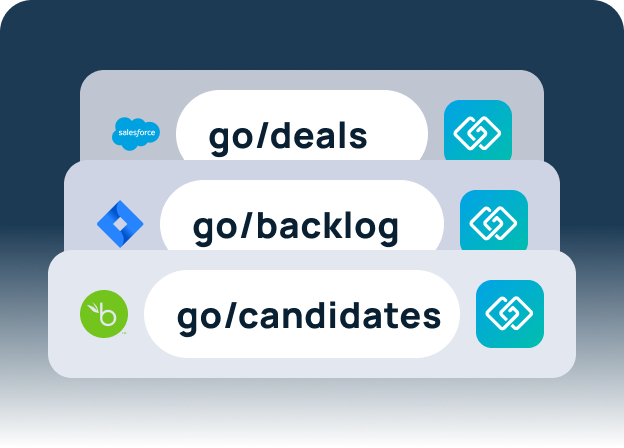
Employee Onboarding Program FAQs
An employee onboarding program is a structured process that helps new hires understand their role, access company systems, learn how work gets done, and build relationships. It usually begins before the first day and continues through the first 30, 60, or 90 days.
An effective employee onboarding program includes preboarding, a first-week plan, role-specific training, peer connection, accessible documentation, manager involvement, remote-ready practices, and ongoing measurement.
Employee onboarding should extend beyond the first day. Many organizations use a 30-, 60-, or 90-day structure, with milestones that progress from orientation to role proficiency and independent contribution.
Orientation is a short introduction to company policies and requirements, while onboarding is the longer process of helping an employee become productive and connected.
Companies can improve remote onboarding by documenting communication norms, centralizing resources, assigning a buddy, and scheduling regular manager check-ins.
GoLinks helps teams create memorable internal shortcuts to onboarding resources such as the employee handbook, benefits portal, security training, IT documentation, and department guides. Teams can share these links in documents, presentations, email, and workplace chat.