


GoLinks product updates in Q2 2026 tackle a problem every growing company runs into: the bigger a go link library gets, the harder it can be to land on the right destination fast. A redesigned “Not Found” page fixes what happens when someone mistypes a go link. New tag, app, and owner filters fix what happens when a search turns up too much. And a native GoLinks app for ChatGPT fixes the problem of having to leave a conversation just to look something up.
Each update is aimed at the same goal: getting people to the right resource in one try, wherever they happen to be working.
This post covers what shipped, why it matters, and how different teams can put it to use.
Quick answer: GoLinks Q2 2026 product updates include three releases. The “Not Found” page has a fresh look and smarter suggestions, using improved pattern matching to surface the right go link, even after a typo. New tag, app, and owner filters in the GoLinks dashboard search bar let teams narrow results with more precision, with GoSearch available as a cross-app option when the answer lives outside the go link library. And a new GoLinks app for ChatGPT lets teams search for and create go links directly from a ChatGPT conversation. Together, these updates cut down on dead ends, wasted searches, and unnecessary tab-switching.
What’s new on the GoLinks “Not Found” page?
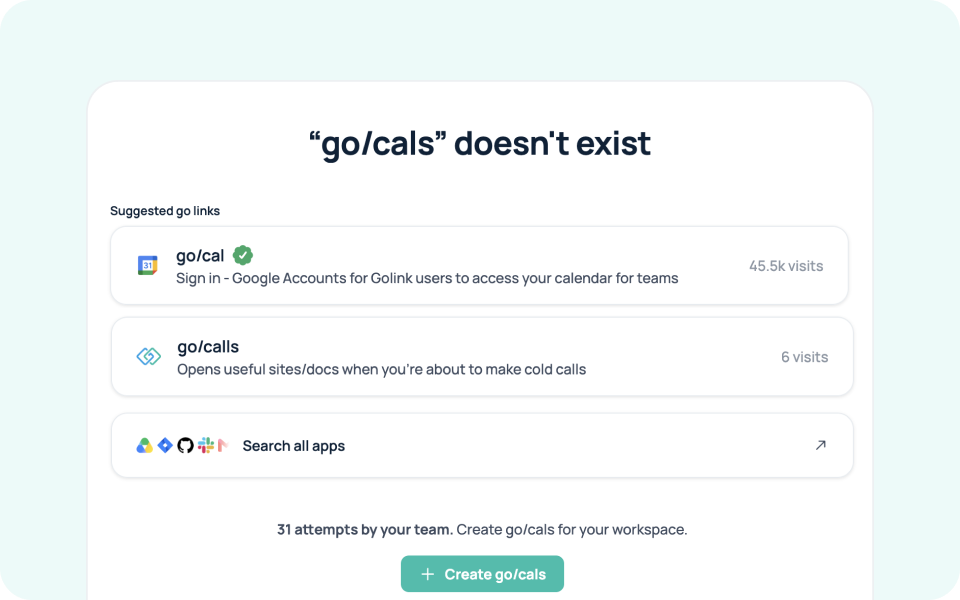
A mistyped go link used to be a dead end. Now, the “Not Found” page has a fresh new look and smarter suggestions, so a near-miss still surfaces the right destination, instead of leaving people stuck. Improved pattern matching and faster results mean the right suggestion shows up more often, even when a query isn’t an exact match.
Every “Not Found” page also shows how many times your team has hit the same missing link, with a one-click option to create it. That turns a dead end into a signal for what your workspace still needs.
Getting employees to the right resource on the first try matters more than it might seem. McKinsey Global Institute research puts the average employee at 9.3 hours a week spent searching for and gathering information, time that adds up fast across a whole organization. A go link that resolves correctly, even when typed imperfectly, is a small piece of gaining that time back.
Benefits by team:
- New hires get a more forgiving way to learn a company’s go link conventions, since a close guess still lands somewhere useful.
- IT and workplace teams get a built-in signal for which go links to create next, based on real attempts instead of guesswork.
- Frequent go link users spend less time re-typing or asking a coworker “wait, what’s the link for that again?”
- Distributed teams get consistent results regardless of who’s setting up or renaming go links across the organization.
How do the new search filters work in GoLinks?
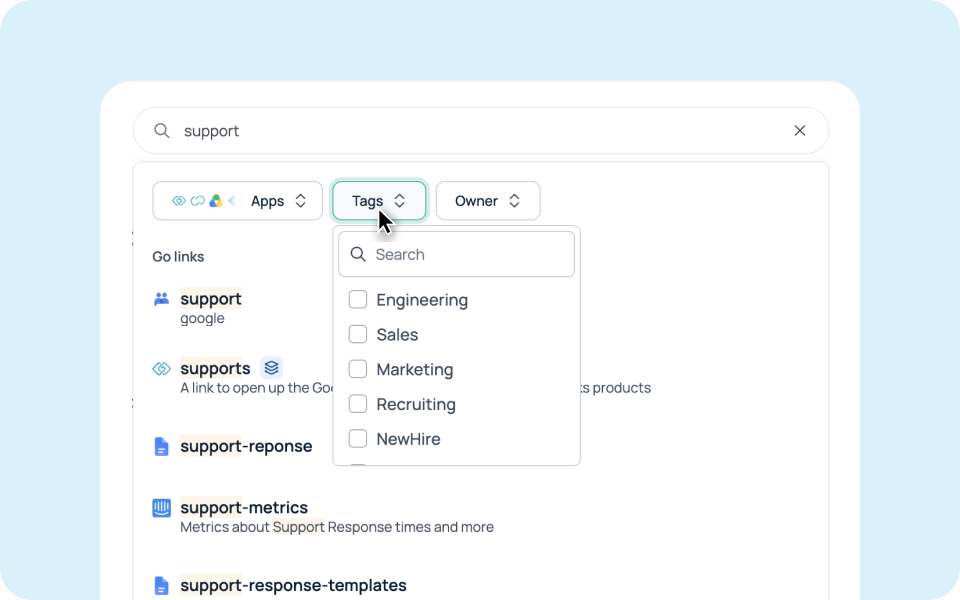
Search with more precision. New tag, app, and owner filters sit right in the GoLinks dashboard search bar, letting you narrow results down to exactly what you need instead of scrolling through everything that matches a keyword. Filter by tags like Engineering, Sales, or Marketing, or by owner, to find the right resource faster.
With the update, you can also filter by specific apps. With one click, you can search across all your apps with GoSearch. When the information you need lives outside your go link library entirely, GoSearch extends that same search across 100+ connected apps, so nothing is out of reach just because it was never turned into a go link.
Benefits by team:
- Large or fast-growing teams can filter a crowded go link library down to what’s relevant instead of scanning dozens of near-matches.
- Department leads can quickly pull up every go link tagged to their team, useful for onboarding or an audit.
- IT admins can filter by owner to track down who manages a given resource, especially useful during offboarding.
- Anyone searching across tools, not just go links, gets a natural path into GoSearch when the answer isn’t a go link at all.
What can you do with the GoLinks app for ChatGPT?
Your team’s go links now go where your team works. The new GoLinks app for ChatGPT lets you search for existing go links and create new ones directly from a ChatGPT conversation, no tab-switching required. Ask ChatGPT for go/roadmap or go/pitch and get the destination instantly, or create a new go link on the spot when your team needs one.
This kind of in-context access matters because of how much of the workday already happens inside ChatGPT. OpenAI’s State of Enterprise AI report puts enterprise workplace seats at more than 7 million, with 92% of Fortune 500 companies now using ChatGPT in some capacity. For a lot of teams, ChatGPT isn’t a separate tool to check, it’s already the tab that’s open. Bringing go links there removes one more reason to leave it.
Benefits by team:
- Anyone already working in ChatGPT can pull up a go link without breaking their flow to open another tab.
- Sales and customer-facing teams can grab go/pitch or go/pricing mid-conversation with a prospect or in a drafting session.
- New hires learning company shorthand can ask ChatGPT directly instead of pinging a teammate for a link.
- Power users can create a new go link the moment they realize one is missing, instead of remembering to do it later.
Getting started
All three GoLinks Q2 2026 product updates are live now, with no setup required to benefit from the “Not Found” page or the new search filters. The GoLinks app for ChatGPT needs to be installed once per user; from there, it works like any other app inside a ChatGPT conversation.
Together, these updates point in the same direction: fewer dead ends, more precise search, and access to your go link library wherever your team is already working.
New to GoLinks? Test out these features and more with a free account. Or book a personalized demo with a GoLinks product expert.
Access and share resources instantly with GoLinks
Try for free
FAQ
You’ll land on a redesigned “Not Found” page with smarter, faster suggestions. Improved pattern matching surfaces the closest real go link even after a typo, so a mistake like go/cals still points you toward go/calls. The page also shows how many times your team has hit that same missing link, with a one-click option to create it.
Yes. The GoLinks app for ChatGPT lets you search for existing go links and create new ones directly from a conversation, without switching tabs. It works the same way any other ChatGPT app does, once installed.