

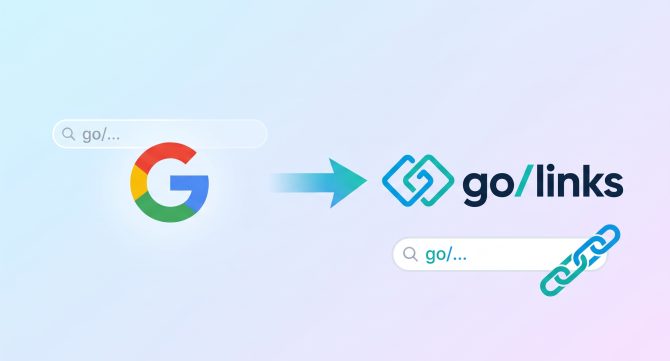

If you worked at Google, you probably typed go/ dozens of times a day. Go/roadmap. Go/okrs. Go/oncall. Every resource your team needed sat one short link away from the address bar.
Then you changed jobs. At your new company, the same information lives behind long Google Doc URLs, buried wiki pages, and bookmarks that only work on your own laptop. Many former Googlers feel that gap in their first week, and many respond the same way: they decide to build a go links tool themselves.
That instinct makes sense. Google, Yahoo, LinkedIn, and other large tech companies all built internal go link systems, and AI coding tools now make a first version quick to create. This guide explains how Google go links work, why you can’t take them with you, and why most companies get better results from a dedicated platform like GoLinks than from a homegrown or vibe-coded build.
Quick answer: Google go links are short, memorable internal URLs, such as go/roadmap, that send employees to the right resource. Google built its version for internal use, so you can’t buy or install it at another company. The closest enterprise equivalent is GoLinks, which includes role-based access control, SOC 2 Type 2 compliance, SSO with SCIM provisioning, and more than 15 native integrations. Building your own is faster than ever with AI, but owning it costs more than buying it once security, governance, and maintenance enter the picture, making GoLinks the better choice.
What are Google go links?
Go links are short, human-readable URLs that an organization controls. An employee types go/keyword into the browser, and the browser redirects to the full destination. Go/benefits might open the HR portal. Go/brandbook might open a Figma file.
Google’s version dates to 2006, when engineers Eric DeFriez and Benjamin Staffin developed a short URL system to improve link sharing around the company. The system introduced the go/ domain, so Googlers could reach any resource by typing go/keyword into the browser.
Why did Yahoo, LinkedIn, and other tech companies build their own go links?
Engineers carry their habits with them. When Marissa Mayer left Google to run Yahoo in 2012, a similar system appeared there under the name yo/links. Go link technology is now core to business operations at companies like LinkedIn as well.
The pattern repeats because a basic go links tool looks easy to build. A redirect table, a login page, and a browser extension get you started. The trouble begins when the whole company starts to rely on the tool.
Can you buy Google’s go links tool?
No. Google’s go links run on Google’s own infrastructure and are not sold as a product. Google did release a Short Links app for Google Apps customers in 2008, but the internal system Googlers use stays inside Google. That leaves ex-Googlers with two options at a new company: build a go links tool or adopt a dedicated platform.
Should you build or buy go links?
Both choices can work in the right situation. Building makes sense when you only need basic redirects, when a platform team has the capacity and the commitment to own and maintain the tool for years, or when strict data residency rules rule out every vendor. If you want to test the idea first, vibe coding a prototype is a fast way to start.
Most companies hit a wall after that first version. Our build versus buy guide walks through the full picture. Version one is the easy part. Security, governance, browser compatibility, and adoption are the work that follows.
Speed also hides risk. Veracode’s 2026 GenAI Code Security Report found that AI models write compilable code at a near-perfect rate, yet the average security pass rate sits at 56 percent. Code that runs is not the same as code that passes a security review. For a tool that sends every employee to internal systems, that gap matters.
What does it cost to build and maintain go links?
The infrastructure bill is the smallest line item. Engineering time drives the real cost. GoLinks estimates the ongoing cost of an internally built go links system like this:
| Cost category | Estimated annual cost |
| Infrastructure | About $2,400 |
| Infrastructure maintenance, 8 hours per month | About $6,720 |
| Maintenance and support, 16 hours per month | About $13,440 |
| Product improvements, one dedicated engineer | About $140,000 |
| Total | About $162,560 |
Those hours come away from customer-facing products, AI initiatives, and core infrastructure. For most companies, go links are infrastructure that employees rely on every day, not a competitive advantage.
What breaks when you vibe code a go links tool?
The redirect itself rarely breaks. Everything around it does. Four areas cause the most trouble.
Reliability. Once employees use go links to reach internal apps and environments, an outage blocks far more than a shortcut. Your team needs monitoring, backups, failover, and incident response.
Security and governance. A company-wide tool needs SSO, SCIM provisioning, role-based permissions, audit logs, and a plan for link ownership when employees leave. A link created by someone who left can break. Duplicate links to the same destination pile up. Each requirement is a program your team must run and certify, not a feature you ship once.
Quiet maintenance failures. A browser update breaks your extension for half the company. An upstream SSO change leaves a deprovisioned employee with access. Your SCIM sync drifts for weeks. None of these trigger an outage alert, and each needs an engineer with context to catch it. The usual arc is that the engineer who built the tool moves to another project and nobody owns the fix queue.
Adoption. A go links tool only helps when employees can find and trust the links in it. Atlassian’s State of Teams 2025 report surveyed 12,000 knowledge workers and 200 executives. It found that teams spend over 25 percent of their workweek searching for information. Search, suggestions for missing links, and integrations where employees share links are product work, not infrastructure work.
The vibe coding guide covers each of these tradeoffs in more detail.
What does GoLinks give you that a homegrown tool does not?
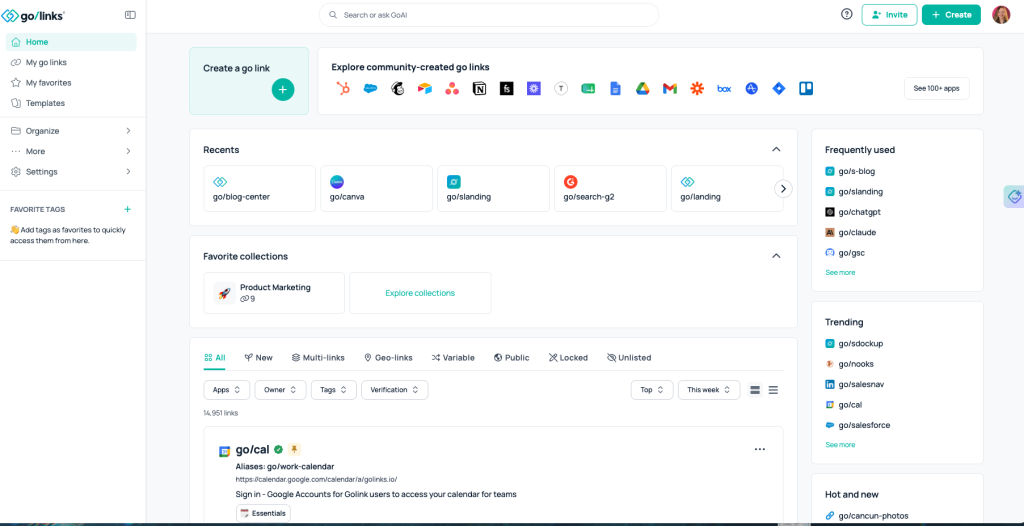
GoLinks keeps what Googlers loved about go/: self-serve link creation, instant redirects, and shortcuts anyone can guess. It then adds the parts a production system needs.
- Security and compliance: SOC 2 Type 2 and GDPR compliance, SSO through Okta, Google, and Microsoft, SCIM provisioning, and audit logs.
- Role-based access control: Workspace permissions decide who can create, edit, and delete links.
- Governance: Link ownership transfers when an employee leaves, so institutional knowledge stays put. Collections and tags organize links by team or project.
- Advanced link types: Geo-links route employees to different destinations by location. Multi-links open several resources at once. Variable Links reuse one shortcut across projects, customers, or environments. Aliases give one destination several names.
- Discovery: GoAI search finds links by meaning, so employees reach the right resource even when they guess the keyword wrong. Suggestions appear when a query has no match.
- Integrations: More than 15 native integrations, including Slack and Microsoft Teams, browser extensions for Chrome, Firefox, Safari, and Edge, plus iOS and Android apps.
- Reliability: A 99.9 percent uptime SLA on fault-tolerant AWS infrastructure.
- Analytics: Usage data shows which links employees use and which resources trend.
Can you still build on top of GoLinks?
Yes. Many engineers want to build because they want go links to plug into internal tools, not because they want to run a redirect engine. GoLinks supports that goal. The GoLinks API handles link creation, editing, deletion, and retrieval. Webhooks fire on link events, so you can log changes or start an approval workflow. The GoLinks MCP server lets AI agents look up, create, and manage links in natural language.
You customize behavior without owning the redirect engine, the SSO layer, or the browser extensions.
How do you bring go links to your new company?
- Start with the free plan or get a demo. Sign up and test the experience or get a personalized walkthrough tailored to your environment.
- Install the browser extension or configure DNS. Both options take minutes.
- Create the links every new hire asks about. Good starters include go/onboarding, go/benefits, go/roadmap, go/okrs, and go/helpdesk.
- Connect your identity provider and set roles. SSO and role-based access control keep the link library governed from day one.
- Share the first links in Slack or Microsoft Teams. Invite each team to create its own.
If your company already runs a homegrown tool, GoLinks migrates your existing links, so nothing starts over.
Ready to bring go/ back? Start with the free plan or book a demo to see role-based access control, GoAI search, and advanced link types in action.
Access and share resources instantly with GoLinks
Schedule a demo
Frequently Asked Questions
What are Google go links?
Google go links are short, memorable internal URLs that start with go/, such as go/roadmap or go/okrs. An employee types the shortcut into the browser and lands on the full destination. Google engineers built the first version in 2006 to make link sharing easier across the company. Many tech companies now use similar systems, and GoLinks offers an enterprise version any company can adopt.
Can you use Google’s go links at another company?
No. Google’s go links run on Google’s internal infrastructure and are not available as a product. Former Googlers who want the same experience at a new company can adopt a dedicated platform such as GoLinks, which works the same way: type go/keyword to reach the right resource.
Is there an enterprise alternative to Google go links?
Yes. GoLinks is an enterprise go links platform built for companies that want the Google experience without building it. It includes role-based access control, SOC 2 Type 2 compliance, SSO with SCIM provisioning, audit logs, and more than 15 native integrations. Admins keep control of who can create, edit, and delete links. Teams can start on a free plan, install the browser extension, and have working go links in minutes.
Should you build or buy a go links system?
For most companies, buying is the better choice. AI coding tools make a first version fast, but production use needs security reviews, SSO, audit logs, browser extension upkeep, and ongoing support. GoLinks estimates an internally built system costs about $162,560 per year when a dedicated engineer is involved. Building makes sense for prototypes, small teams with basic needs, or strict data residency requirements that no vendor can meet.
Can you vibe code a go links app?
Yes, and it works well for a prototype. An AI coding tool can produce a basic redirect app with a database and login in a short time. The challenge starts once the whole company depends on it. Scale, security, governance, and maintenance become your team’s job, and advanced features such as geo-links and variable links each need more engineering work.
How much does it cost to build a go links system in house?
Infrastructure alone runs about $2,400 per year, but engineering time drives the real cost. GoLinks estimates that 8 hours a month of infrastructure maintenance, 16 hours a month of support, and one dedicated engineer for improvements bring the total to roughly $162,560 per year. Those hours come away from customer-facing products and core infrastructure. Most teams leave these costs out of a build versus buy spreadsheet.
Does GoLinks work like go/links at Google?
Yes. Employees type go/ and a keyword in the browser, and GoLinks redirects them to the destination. Anyone with permission can create links, and GoAI search helps employees find existing links even when they guess the keyword wrong. GoLinks also adds enterprise controls, including roles, audit logs, and ownership transfer when an employee leaves. Browser extensions cover Chrome, Firefox, Safari, and Edge.
How long does it take to set up GoLinks?
Most teams go live in minutes. You install the browser extension or configure DNS, connect your identity provider, and create your first links. GoLinks also migrates links from existing internal systems, so a homegrown tool does not have to start over. The free plan lets you test the experience before you involve IT or book a demo.