

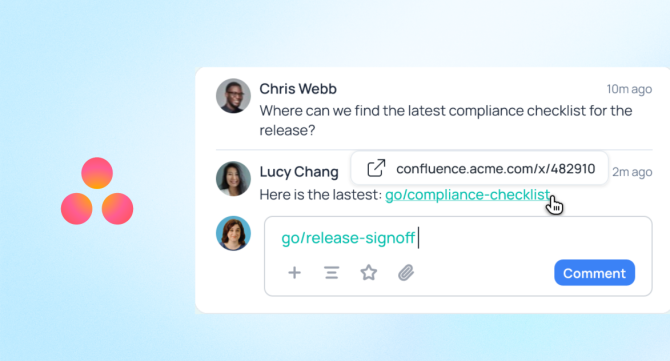

Quick answer: Yes, go links work in Asana. GoLinks has a native app in Asana’s App Directory, one of more than a dozen native GoLinks integrations. Go links in Asana task descriptions and comments automatically turn into clickable links with previews, so teammates always land on the right resource.
Teams use go links everywhere, including Slack, email, Notion, and daily work tools. Asana is one of those tools. Tasks can use go/roadmap, comments can link to go/runbook, and briefs can reference go/brand-guidelines.
Without the integration, none of that is clickable. A go link typed into a task description stays as plain text. Teammates must copy the link, open a new tab, or ask where it leads, defeating its purpose. The GoLinks app for Asana closes that gap. It renders go links the same way Asana already renders any other link: clickable, underlined, and paired with a preview of the destination.
How does the integration work in Asana?
The integration is controlled project by project, not workspace-wide. Turn it on for a project, and go links inside that project’s tasks and comments start converting.
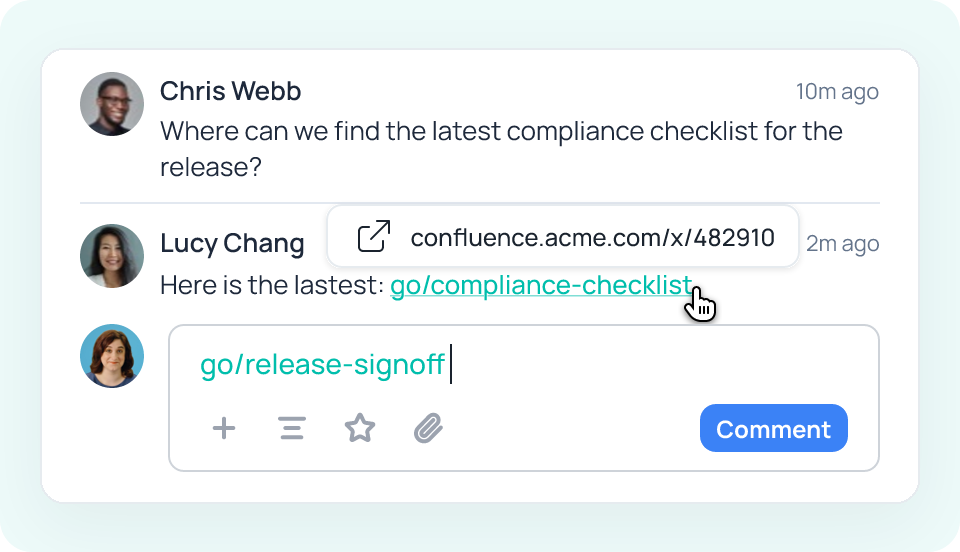
After installation, GoLinks detects go links in task descriptions and comments. Type a link like go/pitch or go/blog, and GoLinks converts it into a clickable link with a preview card, the same way Asana already unfurls a pasted Google Doc or GitHub link. Previews show where links lead, helping teammates find the right resource.
No special formatting is required. Write go links as usual, and Asana converts them when you save.
Where teams put it to use
Go links tend to cluster around whatever a team references constantly, and Asana tasks are full of those references. A few patterns are common:
Engineering. Bug tickets and incident tasks often need the same handful of resources: a runbook, an on-call schedule, a postmortem template. Adding go/runbook or go/postmortem helps engineers find the right documentation without searching the wiki.
Marketing. Campaign and content tasks reference briefs, brand guidelines, and asset libraries constantly. Linking go/campaign-brief or go/brand-guidelines inside a task keeps everyone working from the current version instead of a copy someone saved to their desktop months ago.
Sales and Support. Deal-related tasks benefit from quick access to go/pricing or go/battlecards, so reps and the customer success team pull from the same source instead of an outdated PDF attached to an old email.
HR and People Ops. Onboarding tasks are a natural fit for go/benefits or go/pto, pointing new hires straight to the source of truth instead of a document that may or may not still be accurate.
Getting started
- Install the GoLinks app from Asana’s App Directory or your GoLinks dashboard.
- Open the project where you want go links to become clickable.
- Turn the integration on for that project.
- Type any go link into a task description or comment. It converts automatically as you save.
That’s the entire setup. There’s no separate dashboard to manage inside Asana and nothing to configure beyond turning the app on for a given project. The go links themselves are still created and managed in GoLinks; Asana just renders them correctly once the integration is live.
Asana already runs on go links internally
Asana is a long-time GoLinks customer, which is part of why the integration makes sense as a native app rather than a workaround. The company rolled GoLinks out to every employee within an hour, replacing an aging, unmaintained internal short-link tool it had outgrown. Since then, teams across IT, marketing, engineering, and internal communications have created more than 5,000 go links to keep track of key resources.
Johan Dowdy, Asana’s Global Head of IT, said GoLinks “makes the ability to share data and information a lot easier.” The Asana app extends that same habit into the tool Asana’s own teams already use to plan and track their work every day.
Ready to bring go links into Asana? Book a demo or install the GoLinks app from Asana’s App Directory to get started.
Access and share resources instantly with GoLinks
Schedule a demo
FAQ
Can I use go links in Asana?
Yes. GoLinks has a native app listed in Asana’s App Directory that makes go links clickable inside task descriptions and comments. You don’t need to change how you write a go link. Once the app is installed and turned on for a project, GoLinks automatically converts the text into a clickable link with a preview, so teammates can open it directly instead of guessing where it points.
How do go links become clickable in Asana tasks and comments?
GoLinks detects go link syntax as you type it into a task description or comment and converts it into a clickable link with a preview card. This happens automatically once the app is enabled for that project. You keep writing go links the same way you would in Slack or a browser; Asana just renders them as working links instead of plain text.
Does turning on the app convert every go link across my whole workspace?
No. The integration is enabled project by project, not across an entire workspace at once. Turning it on for one project only affects go links inside that project. This lets teams roll the app out gradually, testing it on one team before expanding it, instead of changing behavior everywhere at once.
Will old tasks and comments update automatically once I turn the app on?
No. GoLinks only converts go links in the tasks and comments you edit yourself after the app is turned on. It doesn’t retroactively scan and rewrite a project’s existing history. If you want an older task’s go link to become clickable, open the task and make an edit, and the conversion applies at that point.
Is this the same as shortening my Asana task URLs?
No. The GoLinks app doesn’t shorten Asana’s own task or project URLs. It makes your company’s existing go links, the internal shortcuts your team already uses to point to docs, dashboards, and other resources, clickable inside Asana. You can also create go links to shorten your Asana task URLs in the GoLinks dashboard or browser extension.