In fast-moving organizations, knowing what matters is only half the battle. The real challenge is turning priorities into action — quickly, consistently, and at scale.
The Eisenhower Matrix is one of the most widely used frameworks for prioritization. It helps individuals and teams distinguish between what’s urgent and what’s important. But while many teams understand the framework, far fewer succeed at operationalizing it inside real workflows.
In today’s environment — where work is distributed across dozens of SaaS tools, Slack threads, documents, dashboards, and meetings — prioritization often breaks down at the execution layer.
This guide explores how modern teams can use the Eisenhower Matrix not just to prioritize work, but to actually execute faster, with practical examples for day-to-day operations.
What Is the Eisenhower Matrix?
The Eisenhower Matrix is a prioritization framework that helps teams decide what to do now, what to schedule, what to delegate, and what to eliminate.
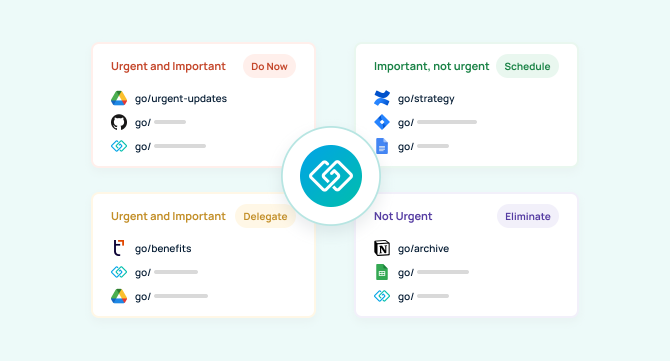
It categorizes work into four quadrants:
1. Urgent + Important — Do Now
Critical tasks that require immediate attention and directly impact outcomes.
2. Important, Not Urgent — Schedule
Strategic work that drives long-term value but doesn’t demand immediate action.
3. Urgent, Not Important — Delegate
Interruptions, requests, and tasks that need quick handling but don’t require your expertise.
4. Not Urgent, Not Important — Eliminate
Low-value activities that drain time without moving work forward.
This framework helps teams clarify priorities, reduce reactive behavior, and protect focus for meaningful work.
But prioritization alone doesn’t guarantee results.
The Real Problem Isn’t Prioritization — It’s Execution
Most teams don’t fail because they can’t identify what’s important. They fail because execution friction slows everything down.
Common blockers include:
- Time wasted searching for links, tools, and documentation
- Context switching between Slack, email, dashboards, and internal systems
- Repeated questions that interrupt deep work
- Fragmented workflows that create decision fatigue
McKinsey estimates that knowledge workers spend nearly 20% of their time searching for information — the equivalent of one full workday per week. That time loss undermines even the best prioritization frameworks.
In other words:
If executing important work is slow, urgent work will always win.
To fully unlock the Eisenhower Matrix, teams need an execution layer that removes friction and speeds up action.
Mapping the Eisenhower Matrix to Real Team Workflows
Let’s explore how the four quadrants map to everyday team operations — and where execution often breaks down.
Urgent + Important — Respond Instantly Without Chaos
Examples:
- Production incidents
- System outages
- Customer escalations
- Security alerts
The challenge:
- Teams scramble across Slack, monitoring dashboards, ticketing tools, and runbooks.
- Critical minutes are lost simply finding the right links and documentation.
Execution principle:
When something is urgent, access must be instant.
High-performing teams create standardized shortcuts like:
- go/incident
- go/oncall
- go/status
- go/support
This allows anyone to launch response workflows in seconds — not minutes.
Important, Not Urgent — Protect Strategic Focus
Examples:
- Product planning
- OKRs
- Roadmaps
- Knowledge documentation
- Training
The challenge:
- Strategic work is repeatedly delayed by small interruptions.
- Teams struggle to protect time for deep work.
Execution principle:
Important work needs low-friction access and clear workflows.
Teams often centralize key resources using shortcuts such as:
- go/strategy
- go/roadmap
- go/okr
- go/training
This reduces context switching and keeps long-term priorities easily accessible.
Urgent, Not Important — Reduce Interruptions Through Delegation
Examples:
- IT requests
- HR questions
- Common operational tasks
- Support workflows
The challenge:
- Experts get interrupted for routine questions.
- Bottlenecks form around a few key people.
Execution principle:
Delegation works best when answers are self-serve.
Teams create shortcuts like:
- go/help
- go/it
- go/benefits
- go/faq
This enables self-service access and dramatically reduces internal interruptions.
Not Urgent, Not Important — Eliminate, Automate, or Ignore
Examples:
- Redundant reporting
- Unused tools
- Low-impact meetings
- Legacy workflows
The challenge:
- These tasks quietly consume time and attention.
- They crowd calendars and mental bandwidth.
Execution principle:
Visibility drives elimination.
By surfacing what teams actually use — and what they don’t — organizations can remove low-value work and free up capacity for higher-impact priorities.
How GoLinks Turns Priorities Into One-Command Actions
The Eisenhower Matrix clarifies what matters. GoLinks removes the friction from doing the work.
By enabling short, memorable shortcuts for internal tools, documents, workflows, and dashboards, GoLinks allows teams to:
- Instantly access critical systems
- Reduce context switching
- Eliminate repeated interruptions
- Standardize workflows across teams
- Scale best practices organization-wide
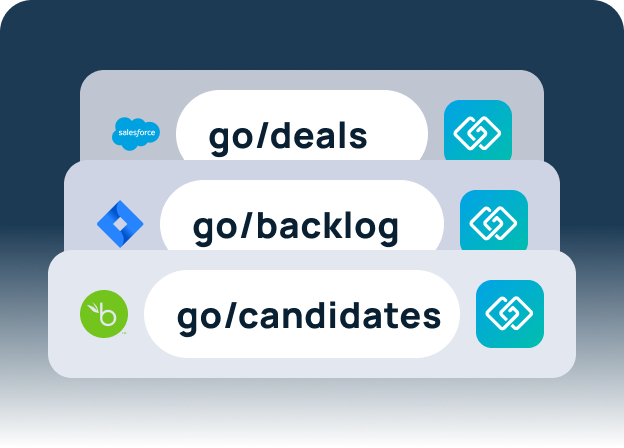
Instead of searching, bookmarking, or asking around, teams simply type: go/whatever-they-need
This turns prioritization into immediate execution.
A Practical Example: Running Your Day With the Eisenhower Matrix + GoLinks
Imagine a product leader starting their day.
Morning Incident (Urgent + Important)
Slack alert fires. They type go/incident and immediately launch the response workflow.
Strategy Work (Important, Not Urgent)
They block time for roadmap planning, using go/strategy and go/roadmap to jump directly into core planning resources.
Interruptions (Urgent, Not Important)
Instead of answering repetitive questions, their teammates go to go/help and go/faq, reducing interruptions and preserving focus.
Low-Value Requests (Neither)
They identify recurring low-impact meetings and eliminate them, freeing up hours each week.
The result:
Less searching. Fewer interruptions. Faster execution. Better outcomes.
When Prioritization Scales, Shared Shortcuts Matter Most
At small scale, individuals can manage their own systems. But as organizations grow, prioritization becomes a team sport.
Shared shortcuts allow organizations to:
- Align on workflows
- Reduce onboarding time
- Standardize processes
- Improve operational velocity
- Increase consistency across departments
This creates organizational muscle memory, where teams instinctively know how to act when urgency strikes.
Key Takeaways: From Priorities to Action
The Eisenhower Matrix is powerful — but only when paired with strong execution.
To help teams move faster:
- Use the matrix to clarify priorities
- Remove friction from daily workflows
- Create instant access to critical resources
- Reduce context switching
- Standardize shortcuts across teams
When prioritization and execution work together, teams don’t just know what matters — they act on it immediately.
Ready to Turn Priorities Into Action?
See how GoLinks helps teams eliminate friction, reduce interruptions, and execute faster — one command at a time. Start using GoLinks for free today.
Access and share resources instantly with GoLinks
Try for free