


Your team probably has go links for the resources people use every day, such as API documentation, deployment runbooks, HR portals, product roadmaps, and internal wikis.
The challenge is remembering the right shortcut when you need it.
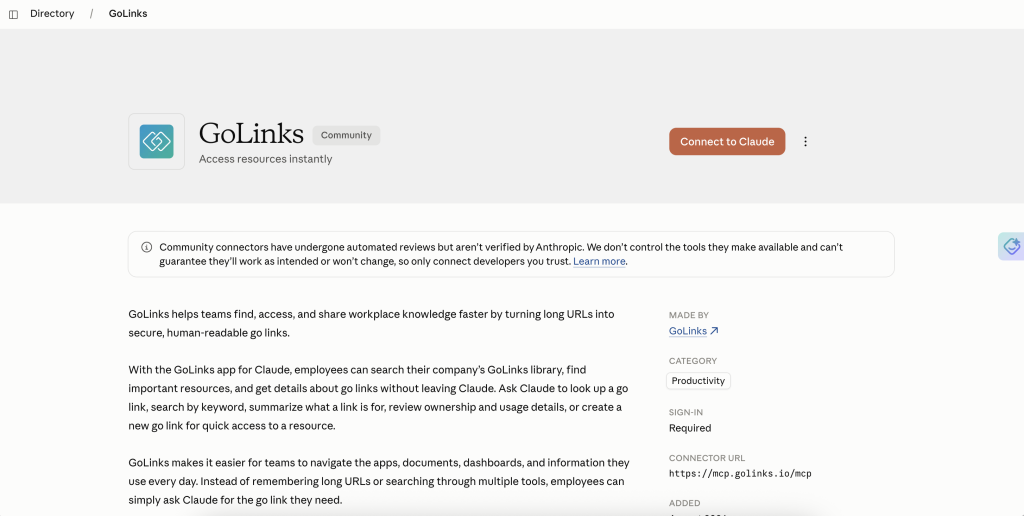
The GoLinks app for Claude lets you search your team’s go link library from a Claude conversation. You can also create a new go link while you work, without opening GoLinks in another tab.
If you need answers from broader company knowledge, GoSearch takes a different approach. Learn how GoSearch works with Claude →
Quick answer:
GoLinks connects your team’s shortcut library to Claude through the Model Context Protocol (MCP). After you connect it, you can ask Claude to find a go link for a resource, search by destination URL, or create a new shortcut from the conversation.
Use GoLinks when you need a specific team resource. Use GoSearch when you want to search broader company knowledge across connected applications.
What does GoLinks do in Claude?
The GoLinks app connects Claude to your team’s go link library through the Model Context Protocol (MCP).
After you connect the app, you can ask Claude to:
- Find a go link for a specific resource
- Search for an existing go link by destination URL
- Create a new go link for a resource
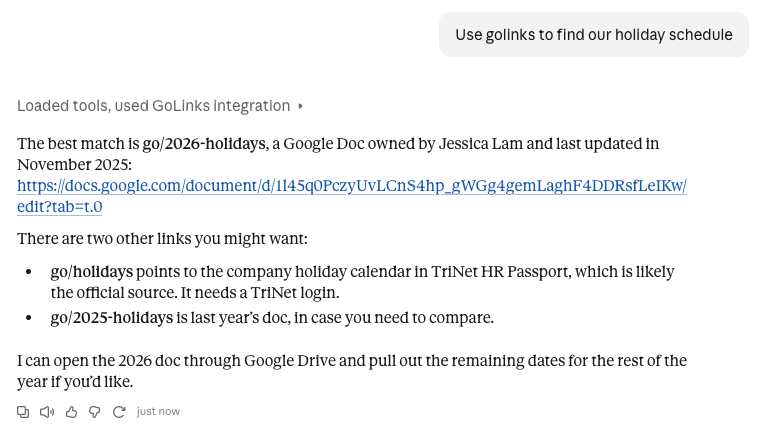
You can ask in plain language. For example:
“What’s the go link for our incident response runbook?”
Claude searches your GoLinks workspace and returns the relevant shortcut. You don’t need to remember the exact go link name.
Find resources while you work
Go links become more useful when they appear in the same place as the work that depends on them.
Suppose you are reviewing an API change in Claude. You can ask for the go link to the API documentation, architecture notes, or deployment runbook. Claude can find the shortcut and return it in the conversation.
You can then open the resource or reference the shortcut in the rest of your work.
This also works when you have the destination URL but do not know whether someone already created a go link for it. Ask Claude to search by URL, and it can check your team’s existing library.
Create go links from Claude
You can create a new shortcut without leaving the conversation.
For example:
“Create a go link called eng-api for this API documentation.”
Claude sends the request through the GoLinks MCP server and creates the shortcut in your authenticated workspace.
This workflow works well when you discover a resource that your team will use repeatedly. Instead of stopping to open GoLinks and create the shortcut separately, you can add it while the resource is already part of the conversation.
Use GoLinks with Claude Code
Go links also fit into coding workflows.
An engineer might ask Claude to find the shortcut for an API specification or deployment runbook. Claude can return the existing go link while the engineer stays focused on the code.
The GoLinks MCP server works with Claude Code and other MCP-compatible coding tools like ChatGPT. That makes team shortcuts available alongside the technical context where people use them.
GoLinks and GoSearch solve different problems
GoLinks gives Claude access to your team’s curated shortcut library. It helps you find resources your team has intentionally named and organized.
GoSearch connects Claude to broader company knowledge across connected business applications. It can search those sources, answer questions using that context, and support agents and workflows.
The distinction is simple:
- Use GoLinks when you know your team has a shortcut for a resource.
- Use GoSearch when you need to search and act across company information.
- Use both when a workflow needs broad context, automation, and a specific team shortcut.
For example, a GoSearch workflow could search several connected applications, find the relevant resource, and then use the GoLinks MCP server to locate or create a shortcut for it.
See how GoSearch works with Claude →
GoLinks MCP vs. GoSearch in Claude
| Capability | GoLinks MCP | GoSearch + Claude |
|---|---|---|
| Find a specific go link | ✓ | ✓ |
| Find a go link by destination URL | ✓ | ✓ through the GoLinks MCP |
| Create a go link | ✓ | ✓ through the GoLinks MCP |
| Search broader company knowledge | ✓ | |
| Search across connected applications | ✓ | |
| Answer questions using company context | ✓ | |
| Support Claude coding workflows | ✓ | ✓ |
| Use go links in AI workflows | ✓ | ✓ |
| Build agents and multi-app workflows | ✓ |
GoLinks helps Claude locate the shortcuts your team already uses. GoSearch helps Claude find and use the broader information behind your work.
How to connect GoLinks to Claude
You need a GoLinks account and API credentials to authenticate the MCP server.
Then configure the GoLinks MCP server in Claude using the standard MCP setup process. Once you connect the server, you can ask Claude to search for or create go links directly from your conversations.
The GoLinks MCP server also works with ChatGPT and other compatible AI tools.
Bring GoLinks into your Claude workflow
GoLinks gives Claude access to the shortcuts your team already uses. You can find a resource by name or destination URL, then create a new go link when someone needs a shortcut for a frequently used page.
Connect the GoLinks MCP server to Claude and keep those actions in the same conversation where your work happens. When you need broader answers from company documents, messages, and connected applications, use GoSearch with Claude. Together, GoLinks and GoSearch help Claude connect specific team resources with the wider context behind them.
Interested in learning more about the GoLinks suite? Book a personalized demo.
Access and share resources instantly with GoLinks
Schedule a demo
Frequently asked questions
GoLinks in Claude connects your GoLinks workspace to Claude through the Model Context Protocol (MCP). Once connected, Claude can search your team’s curated go link library and return the shortcut for a resource you need. You can ask for a go link by name, describe the resource in plain language, or search by its destination URL. This helps you find internal resources without leaving the Claude conversation.
The GoLinks MCP server lets Claude interact with your GoLinks workspace. You can use it to find existing go links, search for shortcuts by destination URL, and create or manage new go links. For example, you could ask Claude to find the shortcut for an incident response runbook or create a new go link for an API documentation page. The server works with Claude, ChatGPT, Claude Code, and other MCP-compatible tools.
Yes. After you connect the GoLinks MCP server and authenticate your workspace, you can ask Claude to create a go link for a resource in the conversation. For example, you might say, “Create a go link called eng-api for this API documentation.” Claude sends the request to your GoLinks workspace and creates the shortcut using the details you provide. This lets you add useful team shortcuts as you discover resources during your work.
GoLinks gives Claude access to your team’s curated go link library, not your entire company knowledge base. It helps Claude find shortcuts that your team has already created for specific resources. If you need to search documents, messages, tickets, or information across connected business applications, use GoSearch with Claude. GoSearch provides broader enterprise search, while GoLinks helps you locate known resources through team-maintained shortcuts.
GoLinks and GoSearch connect Claude to different types of company information. GoLinks focuses on your team’s named shortcuts. Use it when you want to find a specific go link, check whether a resource already has a shortcut, or create a new one. GoSearch searches broader company knowledge across connected business applications and helps Claude answer questions using that context. You can use both together when a workflow needs broad search and access to specific go links.
Yes. GoSearch can connect to the GoLinks MCP server and use go links as part of a larger agent or multi-app workflow. For example, a GoSearch workflow might search connected applications to identify the right resource, then find an existing go link for that resource. If no shortcut exists, the workflow could create one through the GoLinks MCP server. This combination gives Claude access to both broader company context and your team’s curated resource library.
MCP, or Model Context Protocol, is an open standard that lets AI applications connect to external tools and data sources. An MCP server gives an AI tool a defined way to interact with a connected service. The GoLinks MCP server uses this standard to connect Claude and other compatible AI tools to your GoLinks workspace. After you authenticate the connection, Claude can search your go links and create or manage shortcuts according to the access available to your account.